

Frequently asked questions at a glance:
Can I disable the sentiment analysis feature?
Yes, as an administrator, you can disable sentiment analysis at any time and re-enable it if needed.
Navigate to Project Settings > Apps > Community Management and disable the corresponding option under Sentiment Analysis.
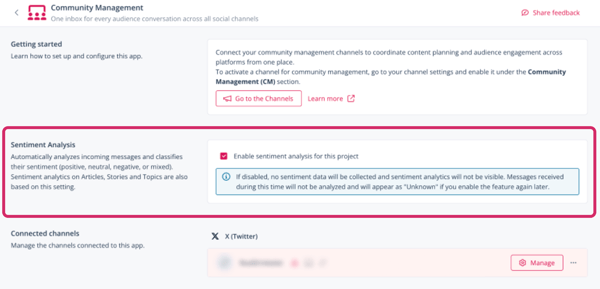
For comments, mentions, and direct messages that were already classified before the sentiment feature was disabled, the classification will be restored when the feature is reactivated. Interactions received while the feature is disabled will be marked as unknown.
Why aren’t mentions and direct messages included in sentiment analysis for topics, stories, and articles?
Direct messages and mentions cannot be published from or reimported to Scompler. Therefore, these interactions cannot be assigned to posts, stories, or topics. As a result, only comments are relevant for sentiment analysis.
For which languages is sentiment analysis available?
The sentiment analysis feature is fully available for comments in English, German, Spanish, French, Italian, Portuguese, Arabic, Hindi, Japanese, Korean, and Chinese. Analysis for comments in other languages may be less accurate.
Why can't I see the sentiment tab in topic, story and article cards?
If Community Management is activated for your project but you don't see the sentiment tab within topic, story or article cards, this can be due to one of the following:
- The sentiment analysis feature is deactivated for your project
- You don't have the required permissions to access the data or analytics tab in the respective object card