
The topic architecture is your central planning view in Scompler. It maps your communication strategy as a tree of categories, topics, stories, and articles, so you can manage planning, statuses, and responsibilities in one place.
The topic architecture is hierarchical and becomes more detailed with each level: Categories group your topics, topics describe what your target groups are interested in, stories tailor a topic to a specific persona, and articles tell the story on your channels. Learn more about the structure of the topic architecture.
The topic architecture is the successor to the previous Topics module and will replace it after the beta phase. Until then, you can activate it yourself and switch back to the previous Topics module at any time.
In the topic architecture, you can:
- edit categories, topics, stories, and articles in one view
- choose the starting level of your view
- display content by story status: as a list or a Kanban board
- customize columns, filters, and sorting and save them as a view
- create, bulk edit, duplicate, export, or delete topics, stories, and articles
- assign topics, stories, and articles to other parent objects via drag and drop
Explore how the new topic architecture works in our interactive demo:
Benefits of the Topic Architecture
|
|
|
|
|
High Performance |
Flexible Starting Level |
Targeted Filters & Shared Views |
|
The topic architecture only loads the data you need right now and handles filters and sorting on the server. This keeps it fast and stable, even with large plans. |
Choose whether the view starts with categories, topics, stories, articles, or story status. The breadcrumb navigation always shows you where you are in the tree. |
Filter by status, assignee, or strategy and save the level, columns, and filters as a view. You can also share your views with other users or teams. |

Activate the Topic Architecture
- Navigate to Topics.
- Click Beta.
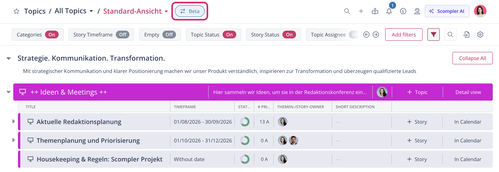
The new topic architecture opens.
You have activated the new topic architecture. If you want to return to the previous version, click New Topic Architecture > Back to the Previous Version at the top of the view.
If you switch back to the previous version, please share your feedback with us. It helps us improve your experience.
More About the Topic Architecture