
Use the division selector in the left navigation to choose which divisions you see. Your selection is personal and stays the same as you move around Scompler.
Prerequisites:
- Divisions are enabled and set up for your project
- Your user role has the Access Divisions permission
Select Divisions
- In the left navigation, click the division selector below the project name.
The list of your divisions opens.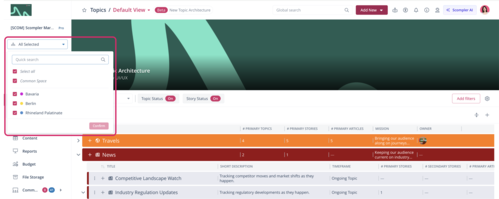
- Select the divisions you want.
- Enable Common Space if you also want to see unassigned objects, or disable it if you don’t.
- Click Confirm.
You have set your division selection. You can change it in the selector at any time, and the current page updates without reloading.
The selector’s label depends on your selection. For example, if you select exactly one division, it shows that division’s name.
Divisions in the Topic Architecture
In the topic architecture, your selection limits the tree, the filter options, the counters, and the export, whatever starting level you have chosen. What counts is the category an object belongs to. A few special cases apply:
- Category filter takes priority: If you filter by a specific category, it is shown even if it’s outside your divisions. This prevents empty views.
- No automatic filtering by users and content types: The selection lists only show your divisions, but you need to set these filters yourself.
- Saved views: Changing your division selection does not mark a view as changed.
Divisions in Other Scompler Modules
Outside the topic architecture, your division selection doesn’t affect every area in the same way. Depending on the area, it only limits the selection options or has no effect.
|
Area |
Effect of the division selection |
|
Filters (all modules) |
Limits the selection options, not the entries shown |
|
Create Article dialog |
Limits the selection options |
|
Strategy settings for categories and content types |
Limits the lists |
|
Calendar, Content module, Dashboards, Reports |
No effect or only a partial effect |