
The import function allows you to display posts in Scompler that you have already published directly on the respective channel or via another tool. New posts will also be synchronized starting from the date the channel is connected.
The imported content is displayed in the following views:
-
Topics
-
Calendar
-
Dashboard
If these posts should also be assigned to your topic plan, you can retrospectively categorize them in the post’s article card under “Planning” or “Strategy”, thereby marking and structuring them accordingly.
How are imported posts categorized?
If multiple post types are assigned to a channel, imported posts are assigned to the first post type associated with that channel. The assignment of imported posts therefore depends on the configured order of post types in the corresponding view (Strategy > Post types).
For example, if “Tweet” is at the top of the post type list, imported tweets will be displayed as the post type “Tweet.”
If, however, “Multipost” (with Twitter as the connected channel) appears at the top of the post type list, the imported tweets will be displayed as “Multipost.”
How do I disable the import of posts?
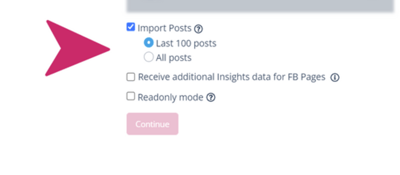
The “Import posts” function is activated when a channel is connected. It can be deactivated by setting up the connection to this channel again and disabling the import in the options that appear.
-
Select Project settings > Integrations.
-
Select the button corresponding to your channel to add it.
-
You will be prompted to re-authenticate the account.
-
Deactivate “Import posts” and click “Next.”
The connected channel will then be saved with the updated settings.
Note: Do not delete the account to change these settings, as this will affect scheduled publications for this channel.
How many posts are imported?
When you connect your social media channel for the first time and activate “Import posts,” a certain number of the most recently published contents will be imported (Twitter, Facebook, Instagram, and YouTube).
The number of posts that can be imported depends on the network and is displayed and, if applicable, defined in the respective settings (see example above).