
Control which user groups can set up individual apps in your project. This allows you to grant access to the groups responsible for specific apps and integrations without giving them permission to manage all apps.
Prerequisite:
Your user group has the Manage Apps permission.
Grant Access to an App
With the update released on August, 12 2026 existing permissions have been migrated automatically. All user groups retain their current access rights. No configuration or reassignment of permissions is required.
- Navigate to Project Settings > Apps.
- Navigate to the app you want to manage access to.
- Click the three-dot menu.
- Select Access Settings.

The Access Settings dialog opens. - From the User groups that can set up this app dropdown menu, select the user groups you want to grant access to.
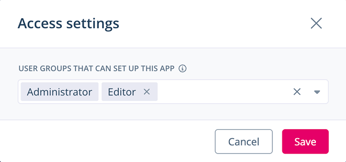
- Click Save.
Managing Presspage, Community Management, and Google Analytics requires additional permissions.