Within the settings of your connected Social Media channels, you can configure their setup, such as determining responsible channel users and, if included in your license, connecting them to Community Management.
This article focuses on the general channel settings. To learn how to connect a channel to Community Management, switch to this article.
Access the Channel Settings
- Navigate to Project Settings > Channels.
- Scroll to the channel for which you want to edit the settings.
- In the three dot menu, select Edit.
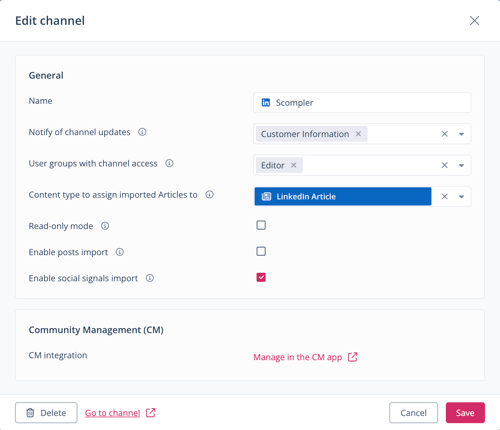
The dialog to edit the channel opens.
You have opened a channel's settings and can now edit them.
Available Channel Settings
The general channel settings include the following fields and options, available throughout all Social Media channels:
- Notify of channel updates
In the dropdown menu, select individual users or teams that are responsible for the channel.
If the field is not filled in, the project owner will be notified in case of required updates. If no user is assigned when publishing content, the responsible users that were assigned in this field, will be notified of the publishing result.
- User groups with channel access
In the dropdown menu, select the user groups that are allowed to publish to the channel.
If no user group is selected, all user groups can publish to the channel.
- Content type to assign imported Articles to
In the dropdown menu, select the content type for Articles that are imported from this channel.
If no content type is selected, imported articled from this channel will be assigned to the first content type in the list.
- Read-only mode
Activate this option if you do not want to publish content on this channel and use it only for e.g. importing posts.
For selected channels, additional options are available:
- Enable posts import (available for X, LinkedIn, Threads, and TikTok channels)
Activate this option if you want to sync natively published posts on this channel to Scompler. - Enable social signals import (available for X, LinkedIn, Threads, and TikTok channels)
Activate this option if you want to sync metrics of published posts on this channel to Scompler.
Social signals are imported starting from the date of the channel integration. Data is not being imported retroactively.
Article metrics can also be imported for selected channels that do not refer to the category Social Media.
- Enable stories import (available for Instagram channels)
Activate this option if you want to sync natively published stories on this channel to Scompler. - Receive additional Insights data for FB Pages (available for Facebook channels)
Activate this option if you want to receive the following analytics data:
- Hide this Article
- Hide all Articles
- Un-like
- Report as spam
- Impression
- Impression (paid)
- Reached
- Reached (paid)
Activating this option deactivates your current Facebook integrations and you will need to reintegrate them.