
Ensure that DeepL is available to all needed user groups. You can find the respective permissions under Project Settings > Users > Groups > Third-Party Integrations.
Prerequisites:
- You have administrator rights
- You have created an API token in DeepL
- Navigate to Project Settings > Apps > DeepL.
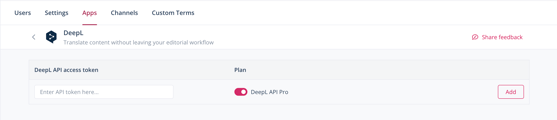
- Under DeepL API access token, enter the API token.
- If you use the free version of DeepL, deactivate the toggle for DeepL API Pro.
- Click Add.
You have connected your DeepL account to Scompler. You can now translate texts within Scompler.
The DeepL account is added on project level. Once added, all users with access can make use of its features.