In the Reports module, you have access to 3 different widget categories:
- general widgets for analyzing articles, stories, and assigned strategy parameters
- social media widgets for analyzing your social media activities
-
community widgets for analyzing your community management activities and your community’s engagement
This article provides an overview of the general widgets available in the Reports module. To learn how to add tabs and widgets in the Reports module, switch to this article.
Ensure that the Reports module features are available to all desired user groups. You can find the corresponding permissions under Project Settings > Users > Groups > Reports.
Available General Widgets
The following widgets are available in the General category of the Reports module:
- Articles by Category
- Articles by Category and Content Type
- Articles by Topic and Content Type
- Articles by Story and Content Type
- Articles by Month and Content Type
- Articles by Status
- Stories by Topic and Status
- Completed Stories
- Strategy coverage in Articles
- Strategy coverage in Stories
Widget: Articles by Category
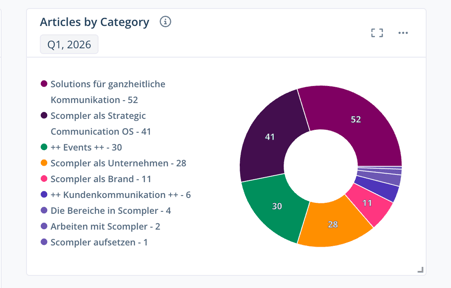
The Articles by category widget shows you how your created articles are distributed across the individual categories.
The following filters are available in the pie chart:
- Time Period
- Content Type
- Category
- Topic
- Story
- Article Status
- Strategy Parameter
- Personas
- Content Models
- Imported Articles (include or exclude)
Widget: Articles by Category and Content Type
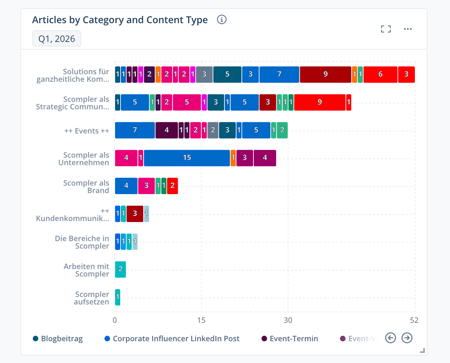
The Articles by Category and Content Type widget provides an overview of articles whose deadline falls within a selected time period, broken down by category and content type.
When you hover over a bar, a flyout opens showing the total number of articles for the respective category and the number of articles per content type. When you hover over a content type in the legend, the corresponding articles are highlighted across all categories.
If you select a comparison period in the filters, the chart additionally shows the change compared to this period below each bar: green indicates improvements, while red indicates declines.
The following filters are available in the chart:
- Time Period (optionally including a comparison period)
- Content Type
- Category
- Topic
- Story
- Article Status
- Strategy Parameter
- Personas
- Content Models
- Imported Articles (include or exclude)
Widget: Articles by Topic and Content Type
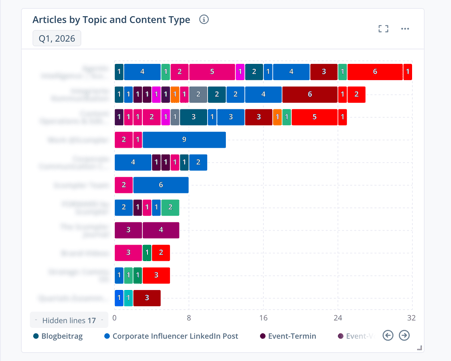
The Articles by Topic and Content Type widget provides an overview of articles whose deadline falls within a selected time period, broken down by topic and content type.
When you hover over a bar, a flyout opens showing the total number of articles for the respective topic and their distribution across the content types. When you hover over a content type in the legend, the corresponding articles are highlighted across all topics.
If you select a comparison period in the filters, the chart additionally shows the change compared to this period below each bar: green indicates improvements, while red indicates declines.
The following filters are available in the chart:
- Time Period (optionally including a comparison period)
- Content Type
- Category
- Topic
- Topic Status
- Story
- Article Status
- Strategiy Parameter
- Personas
- Content Models
- Imported Articles (include or exclude)
Widget: Articles by Story and Content Type
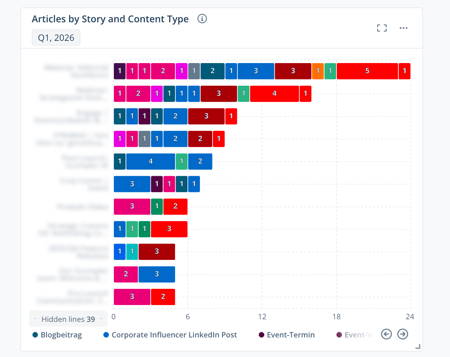
The Articles by Story and Content Type widget provides an overview of articles whose deadline falls within a selected time period, broken down by story and content type.
When you hover over a bar, a flyout opens showing the total number of articles for the respective story and their distribution across the content types. When you hover over a content type in the legend, the corresponding articles are highlighted across all stories.
If you select a comparison period in the filters, the chart additionally shows the change compared to this period below each bar: green indicates improvements, while red indicates declines.
The following filters are available in the chart:
- Time Period (optionally including a comparison period)
- Content Type
- Category
- Topic
- Story
- Story Status
- Article Status
- Strategy Parameter
- Personas
- Content Models
- Imported Articles (include or exclude)
- Include Secondary (include or exclude)
Widget: Articles by Month and Content Type
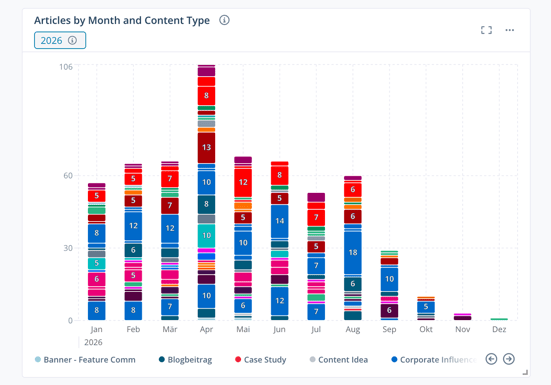
The Articles by Month and Content Type widget provides an overview of articles whose deadline falls within a selected time period, broken down by month and content type.
When you hover over a column, a flyout opens showing the total number of articles for the respective month and their distribution across the content types. When you hover over a content type in the legend, the corresponding articles are highlighted across all months.
The following filters are available in the chart:
- Time Period
- Content Type
- Category
- Topic
- Story
- Article Status
- Strategs Parameter
- Personas
- Content Models
- Imported Articles (include or exclude)
Widget: Articles by Status
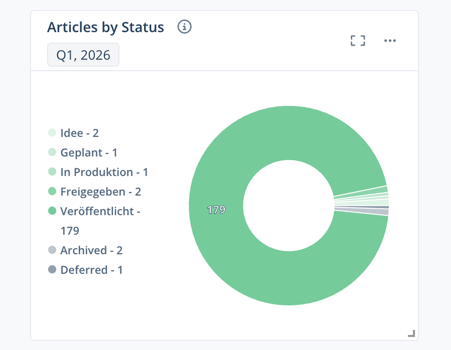
The Articles by Status widget shows you how your created articles are distributed across the individual statuses.
The following filters are available in the pie chart:
- Time Period
- Content Type
- Category
- Topic
- Story
- Strategy Parameter
- Personas
- Teams
- Content Models
- Imported Articles (include or exclude)
Widget: Stories by Topic and Status
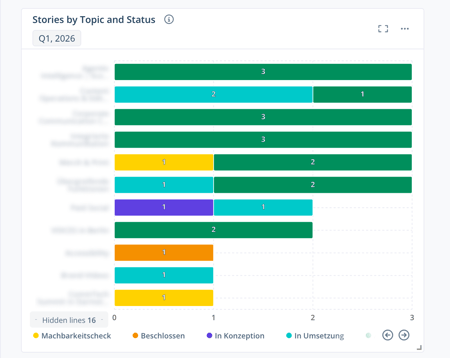
The Stories by Topic and Status widget provides an overview of stories that fall within a selected time period, broken down by status. Ongoing stories and stories without a time period are included if the corresponding filter options are enabled.
When you hover over a bar, a flyout opens showing the total number of stories for the respective topic and their distribution across the statuses. When you hover over a status in the legend, the corresponding stories are highlighted across all topics.
The following filters are available in the chart:
- Time Period
- Category
- Topic
- Topic Status
- Story Status
- Strategy Parameter
- Personas
- Teams
- Content Models
- Show Ongoing Stories (include or exclude)
- Show Stories w/o Date (include or exclude)
- Include Secondary (include or exclude)
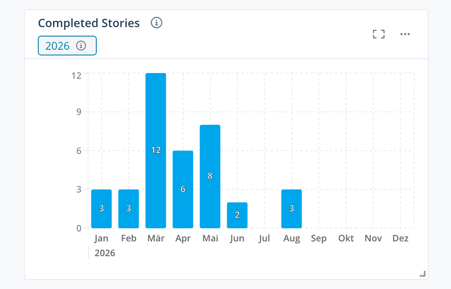
Widget: Completed Stories
The Completed Stories widget provides an overview of stories that were marked as completed within a selected time period.
The following filters are available in the chart:
- Time Period
- Category
- Topic
- Strategy Parameter
- Personas
- Teams
- Content Models
Widget: Strategy Coverage in Articles
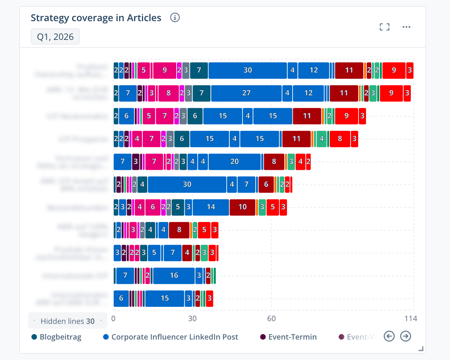
The Strategy Coverage in Articles widget provides an overview of the strategy options, along with the total number of articles in which a specific strategy option was selected, broken down by content type.
When you hover over a bar, a flyout opens showing the total number of articles for the respective strategy parameter and their distribution across the content types. When you hover over a content type in the legend, the corresponding articles are highlighted across all strategy parameters.
The following filters are available in the chart:
- Time Period (optionally including a comparison period)
- Content Type
- Topic
- Story
- Strategy Parameter
- Article Status
- Personas
- Teams
- Content Models
Widget: Strategy Coverage in Stories
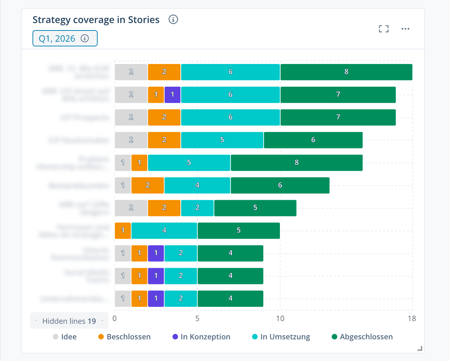
The Strategy Coverage in Stories widget provides an overview of the strategy options, along with the total number of stories in which a specific strategy option was selected, broken down by story status.
When you hover over a bar, a flyout opens showing the total number of stories for the respective strategy parameter and their distribution across the story statuses. When you hover over a story status in the legend, the corresponding stories are highlighted across all strategy parameters.
The following filters are available in the chart:
- Time Period (optionally including a comparison period)
- Topic
- Story
- Story Status
- Strategy Parameter
- Personas
- Teams
- Content Models