Prerequisites:
- You are using the Scompler PRO package
- You have configured an SSO interface
If your organization uses Microsoft Teams for collaboration, you can connect Scompler and Microsoft Teams. The available integrations allow you to:
- access Scompler directly from Microsoft Teams without an additional login
- receive notifications about Scompler activities in Microsoft Teams
Your local IT team manages the installation of the Scompler app and Scombots via the Microsoft Teams Admin Center. For more information on setting up the Microsoft Teams integrations, contact your Customer Success Manager or Scompler Support.
Access Scompler via Microsoft Teams
You can display Scompler as an app within your Microsoft Teams environment. This allows you to collaborate with your colleagues via Microsoft Teams as usual and open Scompler directly from Microsoft Teams at any time.
Automatic sign-in via Single Sign-On (SSO) allows you to access Scompler without an additional login. SSO configuration must be available for external (web/cloud) applications, preferably via Azure AD.
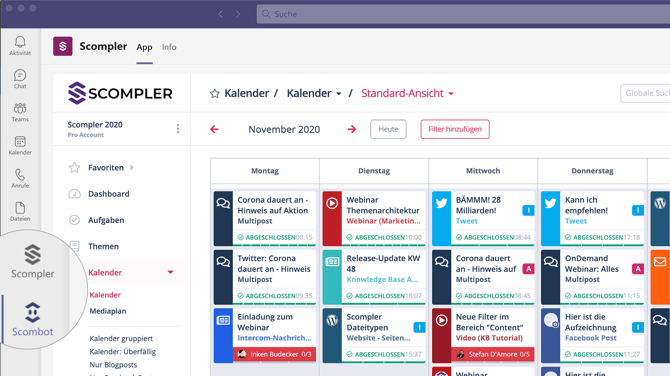
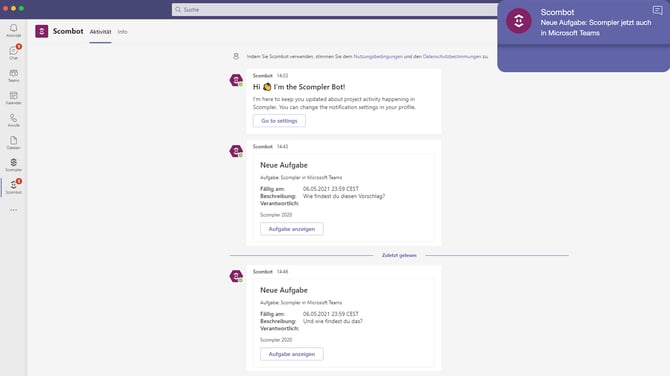
Scombot: Receive notifications from Scompler directly in Microsoft Teams
By installing the Scombot, you can optionally receive your Scompler notifications as Teams pop-ups. These indicate which event you are being notified about and to which article, story, or discussion the notification belongs.
In addition, the messages remain in the Scombot section so you can access them again at any time.
If you have set Internet Explorer as the default browser for your Microsoft applications, Scompler will open in Internet Explorer from within the bot. This browser is no longer supported for Scompler. To avoid this, copy the link and open it in an alternative browser such as Google Chrome or Microsoft Edge.